Introduction to ModelBuilder
Revised 16 January 2026
ModelBuilder is a visual programming language in ArcGIS Pro that allows you use a graphical editor to create custom tools that allow you to automate complex, tedious, or repetitive tasks where there are consistent step-by-step workflow sequences of operations.
Using ModelBuilder, you graphically chain together sequences of tools from the toolbox.
Advantages:
- ModelBuilder diagrams allow you to change parameters and re-run tools without having to retype and remember your prior settings.
- ModelBuilder creates accessible diagrams as documentation for reports.
- ModelBuilder's only prerequisite requirement is familiarity with ArcGIS Pro tools and workflows.
- ModelBuilder is a simpler alternative to Python scripting in ArcPy and requires no background in coding.
- ModelBuilder can be a good solution for GIS people who infrequently create automated workflows.
Disadvantages:
- ModelBuilder provides no ability to automate symbology or layout.
- ModelBuilder creates an illusion of simplicity by hiding important details.
- ModelBuilder promotes vendor lock-in to ESRI products.
- ModelBuilder is a specialized skill, as opposed to Python programming as a general skill.
- ModelBuilder diagrams of complex workflows can be incomprehensible.
- ModelBuilder does not facilitate modular decomposition.
- When you create spaghetti code in a visual programming language, it actually looks like spaghetti.
This tutorial demonstrates the basic use of ModelBuilder to automate simple workflows.
- Workflows
- Create a ModelBuilder Diagram
- Add Tools
- Map and Layout
- View Python
- Saving Diagrams
- Export Diagram
- Reopening Diagrams
- Project Packages
Workflows
A workflow is "the sequence of steps involved in moving from the beginning to the end of a working process" (Merriam-Webster 2023).
ModelBuilder might be better called WorkflowBuilder since what you are usually creating in ModelBuilder are automated workflows for complex sequences of processing tasks rather than models that are analytical representations of real-world phenomena.
ModelBuilder allows you to transform conceptual workflows into sequences of tool operations while also documenting those workflows as diagrams that facilitate communication of information about those workflows with non-technical audiences.
Workflows can be expressed in text as a sequence of steps. For example, this is the workflow for the address selection example given below:
- Import the power plant data from the EIA feature service into the project database using the Export Features tool.
- Import the state data from the U of I feature service into the project database using the Export Features tool.
- Sum the installed capacity by state using the Summarize Within tool.
- Calculate per capita values with the Calculate Field tool.
- Customize the map symbology.
- Create a figure layout map of the affected addresses.
Import Data
This example demonstrates spatial aggregation (spatial join) by using power plant data to calculate per-capita coal-fired power plant generating capacity by state.
- Both data sets are publicly available through the University of Illinois ArcGIS Online organization and can be directly imported into ArcGIS Pro.
- The power plant data was originally from the Energy Information Administration's US Energy Atlas.
- The state polygons were originally from the US Census Bureau with data from the American Community Survey.
You will generally want to import data into your project geodatabase for analysis rather than using feature services directly so that you have a reproducable snapshot of data if you need to reproduce your analysis.
Accordingly you will generally want to run Export Features outside of ModelBuilder because including Export Features on a ModelBuilder diagram will cause the project packaging tool to reload a redundant copy of your data to save as an input to the ModelBuilder tool, which can dramatically slow the process of packaging, unnecessarily increase the size of your project packages, and introduce potential errors if the entire feature service data set cannot be downloaded during packaging.
- Input features: Browse to the feature services in ArcGIS Online (Minn 2024 Power Plants feature service and the States layer from the Minn 2019-2023 ACS feature service)
- Output feature class: Provide meaningful names (Coal_Plants, States).
- Expression: For the power plants, filter on Coal_MW > 0.
Create a ModelBuilder Diagram
To start the ModelBuilder editor, on the Analysis ribbon, select ModelBuilder.
Add Tools
Tools are represented in model builder as rectangles and data is represented with ovals.
- ModelBuilder tools are often daisy-chained, with outputs of each tool to the inputs of the next tool in the sequence.
- Inputs are selected from the dropdown lists in the tool dialogs, and ModelBuilder adds corresponding connection lines to the diagram.
- Where there are multiple files with similar names, this diagramming can help the creator make sure they have selected the appropriate inputs.
To add tools to the ModelBuilder diagram, on the View ribbon, select Geoprocessing, search for the tools and drag them into ModelBuilder.
- Sum the installed capacity by state using the Summarize Within tool.
- Target Features: States
- Join Features: Coal_Plants
- Join Count Field Name: Plant Count
- Output Feature Class: Power_States
- Keep all target features: Leave checked
- Summary Fields: Sum the Install_MWfield
- Run the tool so all fields are present for the next tool.
- Calculate per capita values with the Calculate Field tool.
- Input Table: Power_States
- Field Name: KW_Per_Capita
- Field Type: Double
- Expression: !Sum_Install_MW! * 1000 / !Total_Population!
- Select Add to Display to add the new feature class to the current map.
- Style the map symbology.
Layout
- Insert a new figure layout (6 x 4).
- Add map frame.
- Hide the base map service credits.
- Add and format the legend.
- Share, Export to a PNG (Power_States.png).
- Insert into Word.
Export Diagrams
ModelBuilder diagrams can be exported to SVG and PDF files. Unfortunately, neither of those formats can be directly imported into Word documents.
The closest workaround is to take a screenshot of the diagram (using the PrtScr button on your keyboard), paste it into the document, and then crop to show only the diagram. The diagram will be fuzzy when printed, and getting a better quality document involves doing a conversion from SVG or PDF into PNG using an external program.
View Python
Behind the scenes, ModelBuilder creates Python code that you can view.
On the ModelBuilder ribbon, click the Export options (green arrow) and select Send To Python Window to view or copy the code.
Saving Diagrams
ModelBuilder diagrams are kept in a toolbox that you can view in the Catalog pane.
ModelBuilder diagrams must be explicitly saved using the Save button on the ModelBuilder ribbon.
You must save your diagram before saving your project or saving a project package, or your diagram may be missing some or all components when you reopen the project or project package.
Reopening Diagrams
When you close a diagram tab, you can reopen the diagram in the Catalog Pane from the project toolbox.
Project Packages
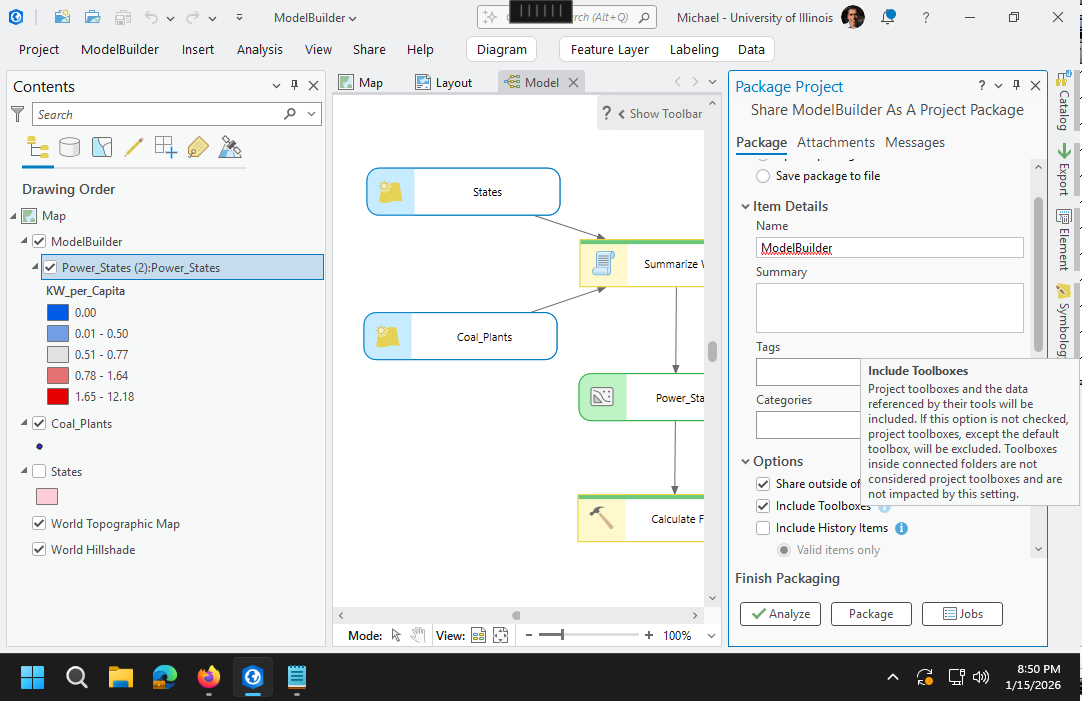
ModelBuilder uses a toolbox that must be included in your project package if you want to be able to use this diagram on a different machine.
Make sure to check both share outside organization and include toolboxes when sharing a project package or the packaging may fail with an unhelpful failure message.
By default, data sets used or created in modelbuilder will be packaged in the project package. For feature services with large amounts of data (like the street centerlines and address points above) this will require significant time to package and upload.
Error 001659: consolidating toolbox
Error 001659: consolidating toolbox can occur when the project package contains large data sets, like the Lake County address points and street centerlines.
The workaround is to Save package to file and then upload the package file (.ppkx) to ArcGIS Online through your My Content page in a browser.
 \\192.168.100.3\DeptUsers\minn2\Documents\ArcGIS\Projects\Model Builder\Model Builder.atbx

Model Builder.ppkx		176	ProjectPackage	University of Illinois
	https://univofillinois.maps.arcgis.com/	minn2@illinois.edu_UnivofIllinois_1190444167
	2022-10-23 21:49:39	Status: InProgress	StatusMessage: Successfully wrote sharing info file
Model Builder.ppkx		176	ProjectPackage	University of Illinois
	https://univofillinois.maps.arcgis.com/	minn2@illinois.edu_UnivofIllinois_1190444167
	2022-10-23 21:49:39	Status: InProgress	StatusMessage: Creating thumbnail from map
Model Builder.ppkx		176	ProjectPackage	University of Illinois
	https://univofillinois.maps.arcgis.com/	minn2@illinois.edu_UnivofIllinois_1190444167
	2022-10-23 21:49:39	Status: InProgress	StatusMessage: About to start the external packaging process
Model Builder.ppkx		176	ProjectPackage	University of Illinois
	https://univofillinois.maps.arcgis.com/	minn2@illinois.edu_UnivofIllinois_1190444167
	2022-10-23 21:49:39	Status: Pending	StatusMessage: Sharing process started
Model Builder.ppkx		176	ProjectPackage	University of Illinois
	https://univofillinois.maps.arcgis.com/	minn2@illinois.edu_UnivofIllinois_1190444167
	2022-10-23 21:49:39	Status: InProgress	StatusMessage: Sharing process started
Model Builder.ppkx		176	ProjectPackage	University of Illinois
	https://univofillinois.maps.arcgis.com/	minn2@illinois.edu_UnivofIllinois_1190444167
	2022-10-23 21:49:39	Status: InProgress	StatusMessage: Reading thumbnail from file
Model Builder.ppkx		176	ProjectPackage	University of Illinois
	https://univofillinois.maps.arcgis.com/	minn2@illinois.edu_UnivofIllinois_1190444167
	2022-10-23 21:49:39	Status: InProgress	StatusMessage: Packaging in progress
Model Builder.ppkx		176	ProjectPackage	University of Illinois
	https://univofillinois.maps.arcgis.com/	minn2@illinois.edu_UnivofIllinois_1190444167
	2022-10-23 21:49:40	Status: InProgress
	StatusMessage: Creating a project package and uploading it to the portal
Model Builder.ppkx		176	ProjectPackage	University of Illinois
	https://univofillinois.maps.arcgis.com/	minn2@illinois.edu_UnivofIllinois_1190444167
	2022-10-23 21:49:40	Status: InProgress	StatusMessage: Compiling packaging parameters
Model Builder.ppkx		176	ProjectPackage	University of Illinois
	https://univofillinois.maps.arcgis.com/	minn2@illinois.edu_UnivofIllinois_1190444167
	2022-10-23 21:49:40	Status: InProgress	StatusMessage: Initiating the packager
Model_Builder.ppkx		176	ProjectPackage	University of Illinois
	https://univofillinois.maps.arcgis.com/	minn2@illinois.edu_UnivofIllinois_1190444167
	2022-10-23 21:49:40	Status: InProgress	StatusMessage: The project package tool has started
Model Builder.ppkx		176	ProjectPackage	University of Illinois
	https://univofillinois.maps.arcgis.com/	minn2@illinois.edu_UnivofIllinois_1190444167
	2022-10-23 22:01:27	Status: Failed
	ErrorMessage: ERROR 001659: Consolidating toolbox
	\\192.168.100.3\DeptUsers\minn2\Documents\ArcGIS\Projects\Model Builder\Model Builder.atbx
Model Builder.ppkx		176	ProjectPackage	University of Illinois
	https://univofillinois.maps.arcgis.com/	minn2@illinois.edu_UnivofIllinois_1190444167
	2022-10-23 22:01:29	Status: Failed	ErrorMessage: Failed to package.
General Function Failure
The General Function Failure seems to occur if you share a project package without saving the diagram from the ModelBuilder ribbon with the Save button.
In some cases you might also need to completely close and restart ArcGIS Pro, reopen the project, and try sharing the package again.
It may also be necessary to close the ModelBuilder diagram before sharing.
Model Builder.ppkx		178	ProjectPackage	University of Illinois
	https://univofillinois.maps.arcgis.com/	minn2@illinois.edu_UnivofIllinois_1190444167
	2022-10-23 23:08:08	Status: InProgress	StatusMessage: Successfully wrote sharing info file
Model Builder.ppkx		178	ProjectPackage	University of Illinois
	https://univofillinois.maps.arcgis.com/	minn2@illinois.edu_UnivofIllinois_1190444167
	2022-10-23 23:08:08	Status: InProgress	StatusMessage: Creating thumbnail from map
Model Builder.ppkx		178	ProjectPackage	University of Illinois
	https://univofillinois.maps.arcgis.com/	minn2@illinois.edu_UnivofIllinois_1190444167
	2022-10-23 23:08:08	Status: InProgress	StatusMessage: About to start the external packaging process
Model Builder.ppkx		178	ProjectPackage	University of Illinois
	https://univofillinois.maps.arcgis.com/	minn2@illinois.edu_UnivofIllinois_1190444167
	2022-10-23 23:08:08	Status: Pending	StatusMessage: Sharing process started
Model Builder.ppkx		178	ProjectPackage	University of Illinois
	https://univofillinois.maps.arcgis.com/	minn2@illinois.edu_UnivofIllinois_1190444167
	2022-10-23 23:08:08	Status: InProgress	StatusMessage: Sharing process started
Model Builder.ppkx		178	ProjectPackage	University of Illinois
	https://univofillinois.maps.arcgis.com/	minn2@illinois.edu_UnivofIllinois_1190444167
	2022-10-23 23:08:08	Status: InProgress	StatusMessage: Reading thumbnail from file
Model Builder.ppkx		178	ProjectPackage	University of Illinois
	https://univofillinois.maps.arcgis.com/	minn2@illinois.edu_UnivofIllinois_1190444167
	2022-10-23 23:08:09	Status: InProgress	StatusMessage: Packaging in progress
Model Builder.ppkx		178	ProjectPackage	University of Illinois
	https://univofillinois.maps.arcgis.com/	minn2@illinois.edu_UnivofIllinois_1190444167
	2022-10-23 23:08:09	Status: InProgress	StatusMessage: Creating a
	project package and uploading it to the portal
Model Builder.ppkx		178	ProjectPackage	University of Illinois
	https://univofillinois.maps.arcgis.com/	minn2@illinois.edu_UnivofIllinois_1190444167
	2022-10-23 23:08:09	Status: InProgress	StatusMessage: Compiling packaging parameters
Model Builder.ppkx		178	ProjectPackage	University of Illinois
	https://univofillinois.maps.arcgis.com/	minn2@illinois.edu_UnivofIllinois_1190444167
	2022-10-23 23:08:09	Status: InProgress	StatusMessage: Initiating the packager
Model_Builder.ppkx		178	ProjectPackage	University of Illinois
	https://univofillinois.maps.arcgis.com/	minn2@illinois.edu_UnivofIllinois_1190444167
	2022-10-23 23:08:09	Status: InProgress	StatusMessage: The project package tool has started
Model Builder.ppkx		178	ProjectPackage	University of Illinois
	https://univofillinois.maps.arcgis.com/	minn2@illinois.edu_UnivofIllinois_1190444167
	2022-10-23 23:08:16	Status: Failed	ErrorMessage: General function failure
Model Builder.ppkx		178	ProjectPackage	University of Illinois
	https://univofillinois.maps.arcgis.com/	minn2@illinois.edu_UnivofIllinois_1190444167
	2022-10-23 23:08:18	Status: Failed	ErrorMessage: Failed to package.
Database Not Found
The cryptic the database was not found packaging failure message apparently occurs because the feature classes created by modelbuilder are placed in the toolbox geodatabase rather than the project geodatabase.
If the Include Toolboxes option is not checked. the ModelBuilder toolbox (and its database) are not included in the project, share outside organization cannot include all feature classes used in project maps, and the packaging fails.
\\192.168.100.3\deptusers\minn2\documents\arcgis\model builder.ppkx		173	projectpackage
	2022-10-23 20:38:26	status: inprogress	statusmessage: successfully wrote sharing info file
\\192.168.100.3\deptusers\minn2\documents\arcgis\model builder.ppkx		173	projectpackage
	2022-10-23 20:38:26	status: inprogress	statusmessage: creating thumbnail from map
\\192.168.100.3\deptusers\minn2\documents\arcgis\model builder.ppkx		173	projectpackage
	2022-10-23 20:38:26	status: inprogress	statusmessage: about to start the external packaging process
\\192.168.100.3\deptusers\minn2\documents\arcgis\model builder.ppkx		173	projectpackage
	2022-10-23 20:38:26	status: pending	statusmessage: sharing process started
\\192.168.100.3\deptusers\minn2\documents\arcgis\model builder.ppkx		173	projectpackage
	2022-10-23 20:38:26	status: inprogress	statusmessage: sharing process started
\\192.168.100.3\deptusers\minn2\documents\arcgis\model builder.ppkx		173	projectpackage
	2022-10-23 20:38:26	status: inprogress	statusmessage: reading thumbnail from file
\\192.168.100.3\deptusers\minn2\documents\arcgis\model builder.ppkx		173	projectpackage
	2022-10-23 20:38:26	status: inprogress	statusmessage: packaging in progress
\\192.168.100.3\deptusers\minn2\documents\arcgis\model builder.ppkx		173	projectpackage
	2022-10-23 20:38:28	status: inprogress	statusmessage: creating a project package and saving it locally
\\192.168.100.3\deptusers\minn2\documents\arcgis\model builder.ppkx		173	projectpackage
	2022-10-23 20:38:28	status: inprogress	statusmessage: compiling packaging parameters
\\192.168.100.3\deptusers\minn2\documents\arcgis\model builder.ppkx		173	projectpackage
	2022-10-23 20:38:28	status: inprogress	statusmessage: initiating the packager
\\192.168.100.3\deptusers\minn2\documents\arcgis\model builder.ppkx		173	projectpackage
	2022-10-23 20:38:28	status: inprogress	statusmessage: the project package tool has started
\\192.168.100.3\deptusers\minn2\documents\arcgis\model builder.ppkx		173	projectpackage
	2022-10-23 20:38:40	status: failed	errormessage: the database was not found.
\\192.168.100.3\deptusers\minn2\documents\arcgis\model builder.ppkx		173	projectpackage
	2022-10-23 20:38:42	status: failed	errormessage: failed to package.
Debugging Packaging Errors
Creating the package with ArcPy using arcpy.management.ProjectPackage() is touted as a debugging technique, but the output about missing tools is equally cryptic.
arcpy.management.PackageProject('\\\\192.168.100.3\\DeptUsers\\minn2\\Documents
	\\ArcGIS\\Projects\\Model Builder\\Model Builder.aprx', 'temp.ppkx')

Traceback (most recent call last):
  File "", line 1, in
  File "C:\Program Files\ArcGIS\Pro\Resources\ArcPy\arcpy\management.py", line 12554, in PackageProject
    raise e
  File "C:\Program Files\ArcGIS\Pro\Resources\ArcPy\arcpy\management.py", line 12551, in PackageProject
    retval = convertArcObjectToPythonObject(gp.PackageProject_management(*gp_fixargs((in_project, output_file,
	sharing_internal, package_as_template, extent, apply_extent_to_arcsde, additional_files, summary, tags,
	version, include_toolboxes, include_history_items, read_only, select_related_rows, preserve_sqlite), True)))
  File "C:\Program Files\ArcGIS\Pro\Resources\ArcPy\arcpy\geoprocessing\_base.py", line 512, in
    return lambda *args: val(*gp_fixargs(args, True))
arcgisscripting.ExecuteError: ERROR 002700: At version 2.2 the "ExportFeatures (conversion)" tool is not available
 ERROR 003498: At version 2.2 the "SelectLayerByLocation (management)" tool's "Input Features"
	parameter's multiValue has changed
Failed to execute (PackageProject).